From a local function to a network service — FastAPI, HTTP verbs, and JSON schemas. Post 2 in the Building Digital Twin Systems series.
digital twin
software engineering
Python
FastAPI
REST API
Author
Jong-Hoon Kim
Published
April 23, 2026
1 What a REST API is and why you need one
In Post 1 we built a validated, testable SIR model function. That function can be called from R or Python by anyone who installs your package. But “install my package” is a high barrier. A hospital surveillance team using a web dashboard cannot import your R package. A pharma client running Julia cannot call your Python function.
A REST API removes this barrier. It exposes your model over HTTP — the same protocol used by every web browser on Earth. Any program in any language that can make an HTTP request (all of them can) can call your model, send parameters, and receive results. Fielding’s doctoral dissertation (1) formalised this architectural style; FastAPI (2) is the modern Python library that makes implementing it straightforward.
Client (any language)        Your server
─────────────────────        ─────────────────────────────────────────
POST /simulate    ──────►    Validate input
{beta: 0.4, ...}             Run sir_model(beta=0.4, ...)
                  ◄──────    Return JSON trajectory
{"trajectory": [...]}
2 REST fundamentals: verbs and resources
REST uses HTTP verbs to express intent on resources (nouns):
Verb
Meaning
Example
GET
Retrieve existing data
GET /scenarios/42 — fetch a stored scenario
POST
Create something new
POST /simulate — run a new simulation
DELETE
Remove a resource
DELETE /scenarios/42
The API returns standard HTTP status codes: 200 OK, 201 Created, 422 Unprocessable Entity (invalid input), 500 Internal Server Error.
3 Setting up FastAPI
FastAPI is installed with pip. The server is run with uvicorn (an ASGI server).
pip install fastapi uvicorn scipy
The complete application below lives in a single file for clarity. In a real product it would be split across modules.
4 Building the epidemic model API
4.1 Step 1 — the model
We use SciPy’s ODE solver (3) for accuracy. It is faster and more numerically stable than the manual Euler loop from Post 1.
# sir_api/model.pyfrom scipy.integrate import solve_ivpimport numpy as npdef sir_rhs(t, y, beta, gamma, N):"""Right-hand side of the SIR ODE system.""" S, I, R = y dS =-beta * S * I / N dI = beta * S * I / N - gamma * I dR = gamma * Ireturn [dS, dI, dR]def run_sir(S0: float, I0: float, beta: float, gamma: float, days: int) ->dict:""" Solve SIR ODEs and return a dict of time-series arrays. """ N = S0 + I0 t_span = (0, days) t_eval = np.arange(0, days +1, dtype=float) y0 = [S0, I0, 0.0] sol = solve_ivp(sir_rhs, t_span, y0, args=(beta, gamma, N), t_eval=t_eval, dense_output=False, method="RK45", rtol=1e-6)return {"time": sol.t.tolist(),"S": sol.y[0].tolist(),"I": sol.y[1].tolist(),"R": sol.y[2].tolist(),"R0": round(beta / gamma, 3),"peak_I": float(np.max(sol.y[1])),"peak_day": int(np.argmax(sol.y[1])), }
4.2 Step 2 — Pydantic schemas
FastAPI uses Pydantic models to define and validate the shapes of requests and responses. Every field gets a type and optional constraints. FastAPI enforces them automatically — no manual if beta <= 0: raise needed.
import httpxresp = httpx.post("http://localhost:8000/simulate", json={"S0": 9900, "I0": 100,"beta": 0.4, "gamma": 0.1, "days": 60})data = resp.json()print(f"R0={data['R0']}, peak on day {data['peak_day']}")
From the command line:
curl-s-X POST http://localhost:8000/simulate \-H"Content-Type: application/json"\-d'{"S0":9900,"I0":100,"beta":0.4,"gamma":0.1,"days":60}'|python3-m json.tool
7 What happens when inputs are invalid
Send a negative beta:
curl-s-X POST http://localhost:8000/simulate \-H"Content-Type: application/json"\-d'{"S0":9900,"I0":100,"beta":-0.4,"gamma":0.1,"days":60}'
FastAPI returns:
{"detail":[{"type":"greater_than","loc":["body","beta"],"msg":"Input should be greater than 0","input":-0.4}]}
No simulation code ran. The validation layer stopped it immediately and produced a clear, actionable error message. This is exactly what production software must do.
8 Project structure at this stage
sir_project/
├── sir_api/
│   ├── __init__.py
│   ├── main.py          ← FastAPI application
│   ├── model.py         ← SIR ODE solver
│   └── schemas.py       ← Pydantic request/response models
├── tests/
│   ├── test_model.py    ← unit tests (from Post 1)
│   └── test_api.py      ← API tests using httpx.TestClient
└── pyproject.toml
8.1 Testing the API itself
FastAPI provides a TestClient so you can test the full HTTP stack without starting a server:
The server runs elsewhere, but we can verify the API contract locally in R by simulating what the call and response look like — using the same model logic from Post 1:
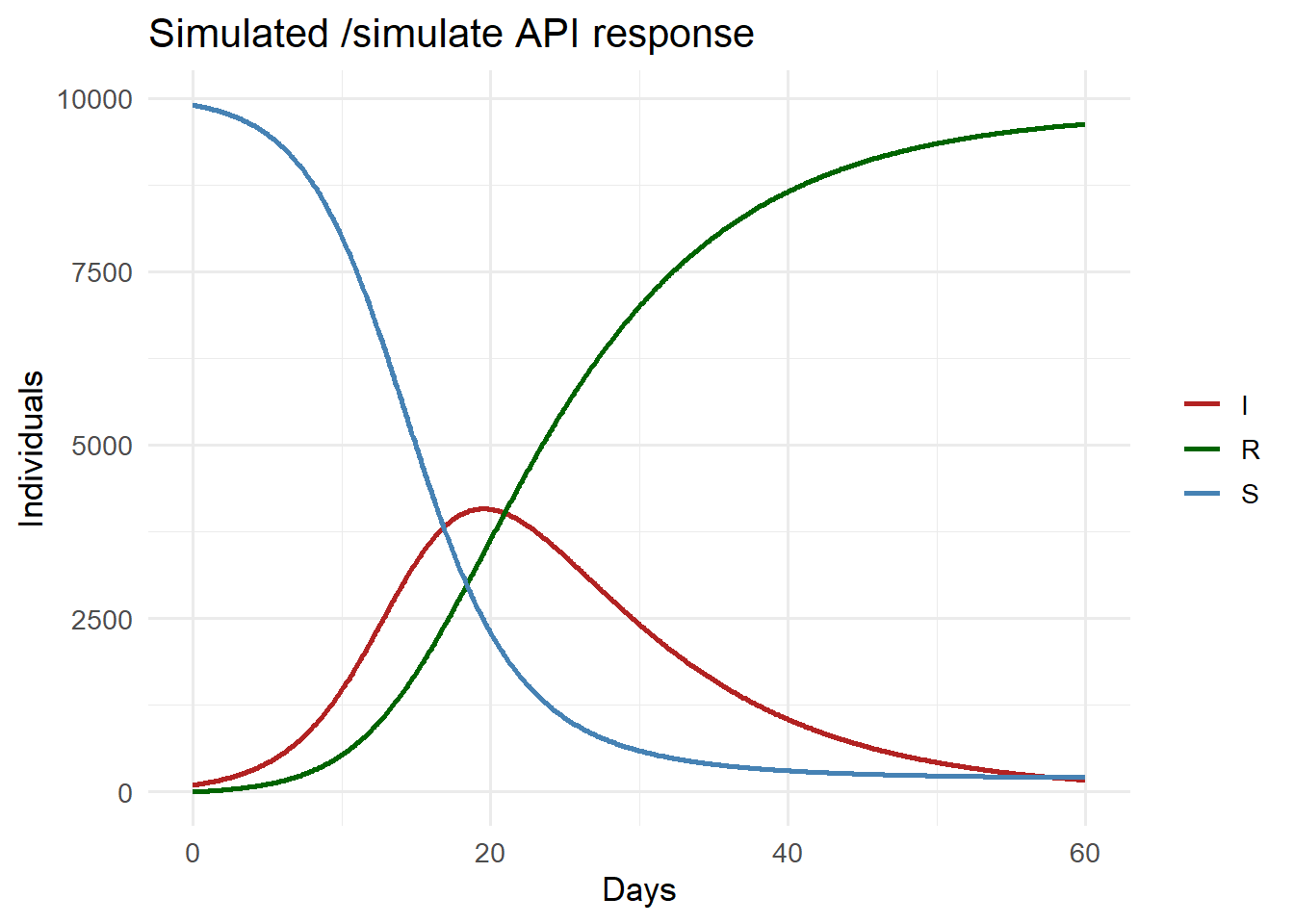
library(ggplot2)library(tidyr)# Reproduce what the /simulate endpoint computessir_euler <-function(S0, I0, beta, gamma, days, dt =0.1) { N <- S0 + I0 steps <-round(days / dt) out <-data.frame(time =numeric(steps +1),S =numeric(steps +1),I =numeric(steps +1),R =numeric(steps +1)) S <- S0; I <- I0; R <-0 out[1, ] <-c(0, S, I, R)for (i inseq_len(steps)) { inf <- beta * S * I / N * dt rec <- gamma * I * dt S <- S - inf; I <- I + inf - rec; R <- R + rec out[i +1, ] <-c(i * dt, S, I, R) } out}traj <-sir_euler(9900, 100, beta =0.4, gamma =0.1, days =60)cat(sprintf("R0 = %.2f | peak I = %.0f on day %.0f\n",0.4/0.1, max(traj$I), traj$time[which.max(traj$I)]))
Simulated API response: SIR trajectory for beta=0.4, gamma=0.1, 60 days. This is what /simulate returns as a JSON array.
10 Summary and what comes next
We have an epidemic model API that:
Accepts a JSON request over HTTP from any language
Validates every input field automatically
Returns a typed JSON response with the full trajectory
Produces clear error messages for invalid inputs
Has auto-generated interactive documentation
The API runs on your laptop. To be useful as a product it must run anywhere, reliably, with reproducible behaviour. That requires containerisation — the topic of Post 3, where we package the API and all its dependencies into a Docker container.
11 References
1.
Fielding RT. Architectural styles and the design of network-based software architectures. 2000.
Virtanen P, Gommers R, Oliphant TE, Haberland M, Reddy T, Cournapeau D, et al. SciPy 1.0: Fundamental algorithms for scientific computing in Python. Nature Methods. 2020;17:261–72. doi:10.1038/s41592-019-0686-2