Real-Time Simulation Progress Streaming with WebSockets
Long-running EnKF jobs need live feedback. WebSocket push turns a waiting spinner into an informative progress stream. Skill 13 of 20.
business skills
WebSockets
real-time
FastAPI
R
API
Author
Jong-Hoon Kim
Published
April 24, 2026
1 The problem with long-running simulations
A standard HTTP request has a request–response cycle: client asks, server computes, server replies. If the computation takes 30 seconds, the client waits with a blank spinner. If it takes 5 minutes, most HTTP clients time out.
For epidemic simulations — parameter sweeps, scenario ensembles, full Bayesian MCMC — computation time is measured in minutes, not milliseconds. Clients need three things:
Progress indication: “On iteration 45 of 200”
Partial results: display preliminary estimates as they arrive
Graceful cancellation: stop the run if the client navigates away
WebSockets(1) solve this. Unlike HTTP, a WebSocket connection stays open after the initial handshake. The server can push messages to the client at any time — progress updates, intermediate results, error notifications.
2 WebSocket vs Server-Sent Events
WebSocket
Server-Sent Events (SSE)
Direction
Bidirectional
Server → client only
Protocol
ws:// or wss://
HTTP
Browser support
Excellent
Excellent
Reconnect
Manual
Automatic
Best for
Interactive, two-way
Progress streams
For simulation progress (server → client only), SSE is simpler. For interactive dashboards where the client sends slider updates, WebSocket is needed. We cover WebSocket as it is more general (2).
3 FastAPI WebSocket implementation
# server.pyfrom fastapi import FastAPI, WebSocketimport asyncio, jsonapp = FastAPI()asyncdef run_enkf_with_progress(obs: list, ws: WebSocket):"""Run EnKF and send progress updates over WebSocket.""" n_steps =len(obs) beta_est =0.30 I_est = obs[0] if obs else10for t, y_t inenumerate(obs):# Simulate one EnKF update stepawait asyncio.sleep(0.05) # represents real computation innov = y_t - I_est K =0.3 I_est =max(0, I_est + K * innov) beta_est =max(0.05, beta_est +0.001* innov /max(y_t, 1))# Push progress to clientawait ws.send_json({"type": "progress","step": t +1,"total": n_steps,"pct": round((t +1) / n_steps *100, 1),"I_est": round(I_est, 1),"beta_est": round(beta_est, 4) })# Final resultawait ws.send_json({"type": "complete","I_final": round(I_est, 1),"beta_final": round(beta_est, 4) })@app.websocket("/ws/enkf")asyncdef enkf_websocket(websocket: WebSocket):await websocket.accept() data =await websocket.receive_json() obs = data.get("obs", [])await run_enkf_with_progress(obs, websocket)await websocket.close()
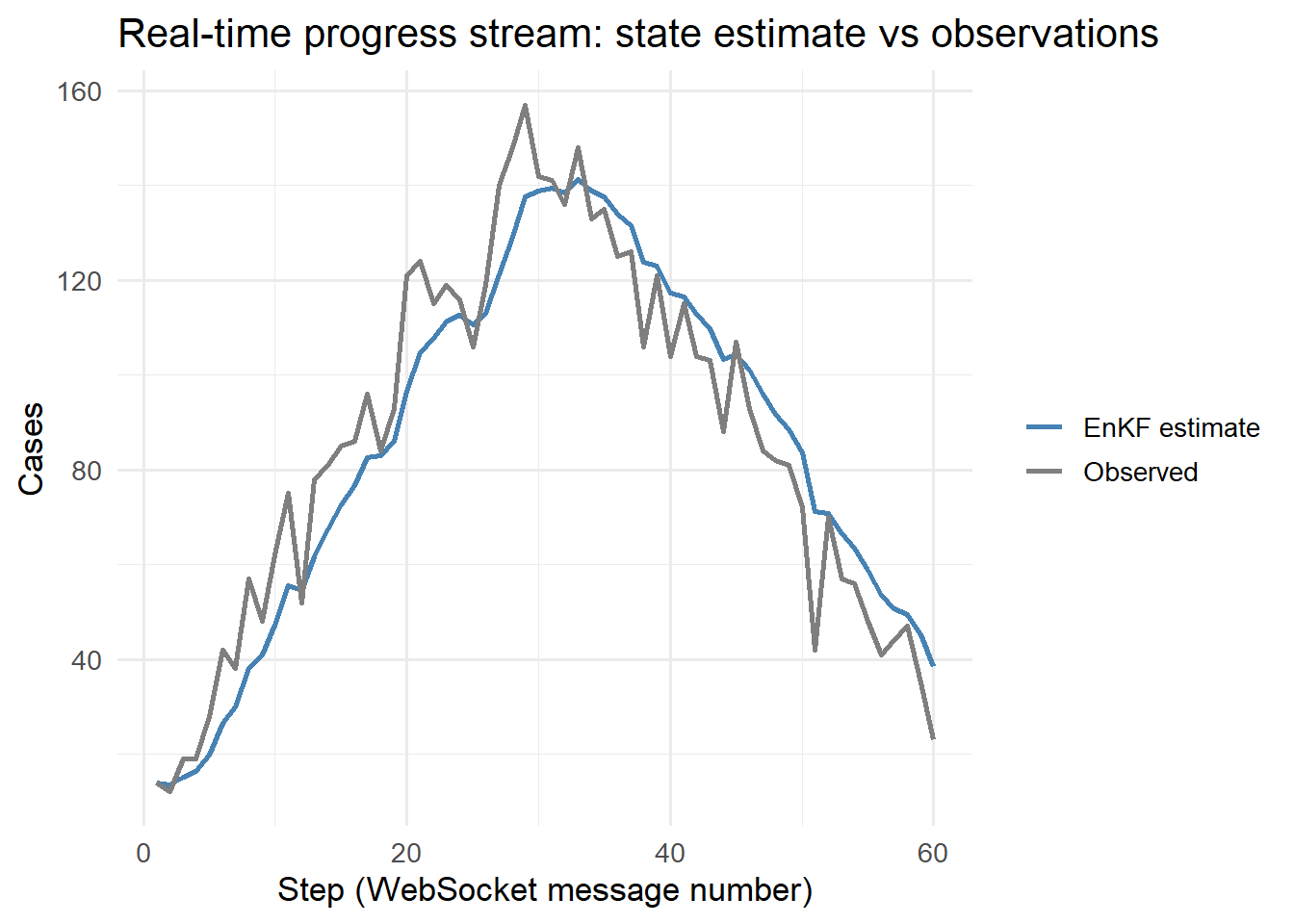
Simulated WebSocket progress stream: top panel shows EnKF state estimate updating in real time; bottom panel shows transmission rate β converging. Each row is one WebSocket message pushed to the client.
6 Reconnection and heartbeats
WebSocket connections drop — mobile networks, server restarts, load balancer timeouts. Handle this gracefully:
# Server: send a heartbeat every 30 seconds to keep the connection aliveasyncdef run_with_heartbeat(ws: WebSocket): heartbeat_task = asyncio.create_task(send_heartbeat(ws))try:await run_enkf_with_progress(obs, ws)finally: heartbeat_task.cancel()asyncdef send_heartbeat(ws: WebSocket):whileTrue:await asyncio.sleep(30)await ws.send_json({"type": "heartbeat"})
// Client: reconnect on disconnectws.onclose= () => {console.log("Connection lost, reconnecting in 3s...");setTimeout(() =>connectWebSocket(),3000);};
7 When to use WebSockets vs polling
Use WebSockets when: computation takes > 10 seconds, you want sub-second latency updates, or you need bidirectional communication.
Use polling (repeated HTTP GET every 5s) when: simplicity matters more than latency, or your infrastructure does not support persistent connections (some serverless platforms).
For epidemic models with 30–120 second run times, WebSockets are the right choice.
8 References
1.
Fette I, Melnikov A. The WebSocket protocol. RFC 6455; 2011. doi:10.17487/RFC6455