Infrastructure as Code: Reproducible AWS Environments with Terraform

Clicking through the AWS console is a recipe for undocumented, unreproducible infrastructure. Terraform turns cloud resources into version-controlled code. Skill 14 of 20.

business skills
infrastructure as code
Terraform
AWS
DevOps
Author

Jong-Hoon Kim

Published

April 24, 2026

1 The “snowflake server” problem

You spend two days clicking through the AWS console to configure an EC2 instance, install Docker, set up TimescaleDB, and configure the load balancer. It works perfectly. Three months later you need to replicate this environment for a second client — and you cannot remember exactly what you did. The original server is a snowflake: unique, unreproducible, undocumented.

Infrastructure as Code (IaC) (1) solves this by expressing every cloud resource as a configuration file that lives in git. Terraform is the most widely used IaC tool; it supports AWS, GCP, Azure, and 200+ other providers. (2)

2 Core Terraform concepts

Concept Description
Provider Plugin for a cloud platform (AWS, GCP, etc.)
Resource A cloud object (EC2 instance, RDS, S3 bucket)
Module Reusable collection of resources
State file Terraform’s record of what it created
Plan Dry-run preview of what will change
Apply Execute the planned changes

The workflow is always: terraform plan → review → terraform apply.

3 The digital twin stack in Terraform

The complete Terraform configuration for the stack built in Posts 1–7:

# main.tf
terraform {
  required_providers {
    aws = { source = "hashicorp/aws", version = "~> 5.0" }
  }
  # Remote state storage (so multiple team members share state)
  backend "s3" {
    bucket = "my-terraform-state"
    key    = "dt-stack/terraform.tfstate"
    region = "us-east-1"
  }
}

provider "aws" {
  region = var.aws_region
}

# ── VPC ─────────────────────────────────────────────────────────────
resource "aws_vpc" "dt_vpc" {
  cidr_block           = "10.0.0.0/16"
  enable_dns_hostnames = true
  tags = { Name = "dt-vpc-${var.environment}" }
}

resource "aws_subnet" "public" {
  vpc_id                  = aws_vpc.dt_vpc.id
  cidr_block              = "10.0.1.0/24"
  map_public_ip_on_launch = true
}

resource "aws_subnet" "private" {
  vpc_id     = aws_vpc.dt_vpc.id
  cidr_block = "10.0.2.0/24"
}

# ── EC2 ─────────────────────────────────────────────────────────────
resource "aws_instance" "dt_server" {
  ami                    = var.ami_id
  instance_type          = var.instance_type    # "t3.small" for dev
  subnet_id              = aws_subnet.public.id
  vpc_security_group_ids = [aws_security_group.dt_sg.id]
  iam_instance_profile   = aws_iam_instance_profile.dt_profile.name
  key_name               = var.key_name

  user_data = templatefile("startup.sh.tpl", {
    db_secret_arn = aws_secretsmanager_secret.db_password.arn
    ecr_repo      = aws_ecr_repository.dt_api.repository_url
  })

  tags = { Name = "dt-server-${var.environment}" }
}

# ── ECR ─────────────────────────────────────────────────────────────
resource "aws_ecr_repository" "dt_api" {
  name                 = "dt-api"
  image_tag_mutability = "MUTABLE"
}

# ── Secrets ─────────────────────────────────────────────────────────
resource "aws_secretsmanager_secret" "db_password" {
  name = "dt/${var.environment}/db-password"
}

resource "aws_secretsmanager_secret_version" "db_password" {
  secret_id     = aws_secretsmanager_secret.db_password.id
  secret_string = jsonencode({ password = var.db_password })
}

4 Variables and environments

# variables.tf
variable "environment"     { default = "dev" }
variable "aws_region"      { default = "us-east-1" }
variable "instance_type"   { default = "t3.small" }
variable "ami_id"          {}
variable "key_name"        {}
variable "db_password"     { sensitive = true }

# terraform.tfvars (NEVER commit this — add to .gitignore)
environment   = "dev"
ami_id        = "ami-0abcdef1234567890"
key_name      = "my-keypair"
db_password   = "super-secret-password"

Create separate terraform.tfvars files per environment:

terraform plan  -var-file="envs/dev.tfvars"
terraform apply -var-file="envs/prod.tfvars"

5 The plan/apply cycle in R

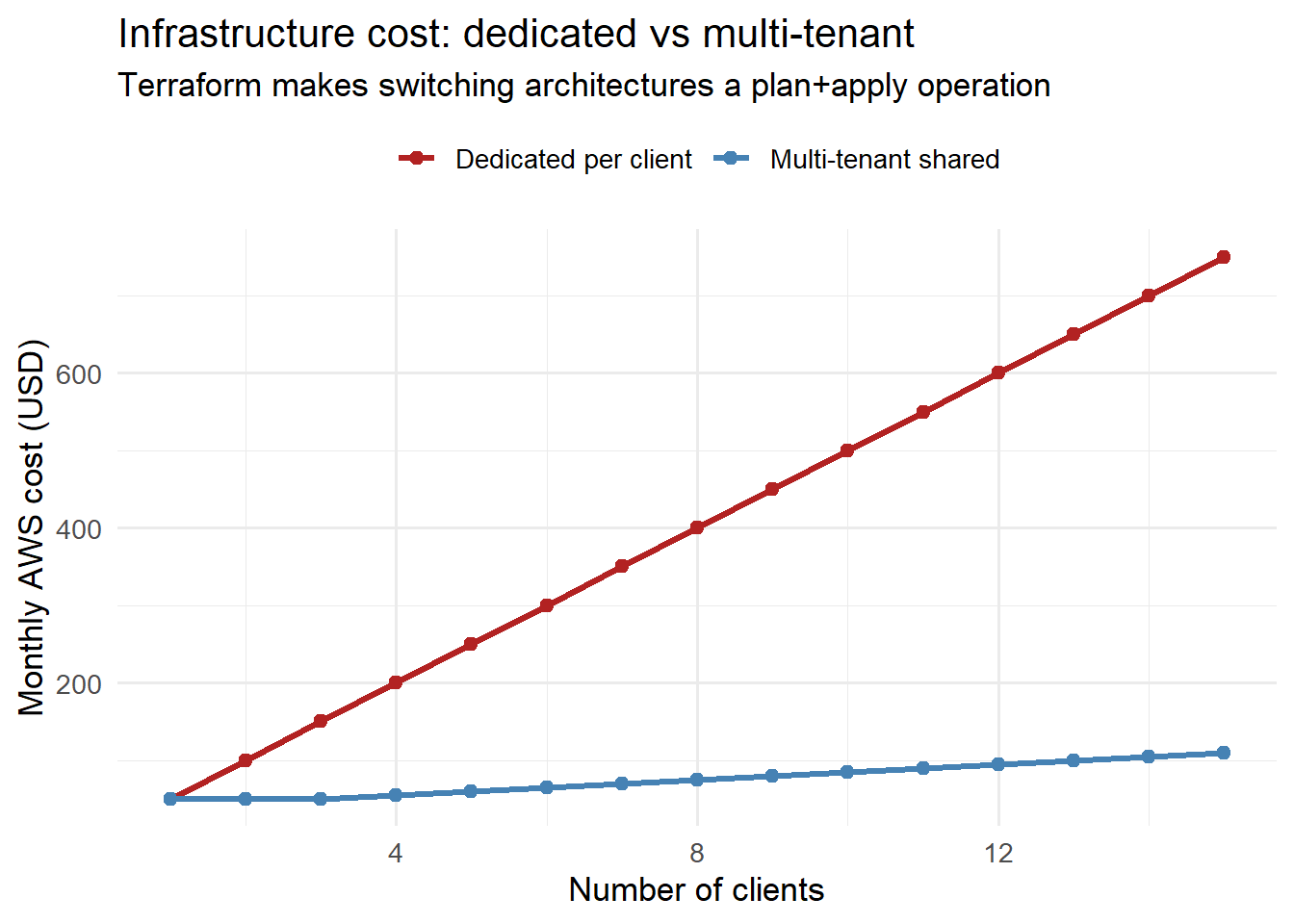
Infrastructure costs money. Model the cost impact before applying:

library(ggplot2)

n_clients <- 1:15

# Single-instance model: one EC2 + RDS per client
cost_single <- n_clients * (15 + 15 + 20)   # EC2 + RDS + ALB

# Multi-tenant: shared EC2 + RDS, cost grows slowly
cost_multitenant <- 15 + 15 + 20 +           # base: EC2 + RDS + ALB
                    pmax(0, (n_clients - 3)) * 5   # extra compute per client

df_cost <- data.frame(
  clients      = rep(n_clients, 2),
  cost         = c(cost_single, cost_multitenant),
  architecture = rep(c("Dedicated per client",
                       "Multi-tenant shared"), each = length(n_clients))
)

ggplot(df_cost, aes(x = clients, y = cost, colour = architecture)) +
  geom_line(linewidth = 1.2) +
  geom_point(size = 2) +
  scale_colour_manual(values = c("Dedicated per client" = "firebrick",
                                  "Multi-tenant shared"  = "steelblue"),
                      name = NULL) +
  labs(x = "Number of clients", y = "Monthly AWS cost (USD)",
       title = "Infrastructure cost: dedicated vs multi-tenant",
       subtitle = "Terraform makes switching architectures a plan+apply operation") +
  theme_minimal(base_size = 13) +
  theme(legend.position = "top")

Monthly AWS cost vs number of concurrent clients. At low scale, a single-instance setup is cheapest. Above ~5 clients, the cost of managing separate instances outweighs the overhead of load balancer + auto-scaling.

6 Modules for reuse

Extract the EC2 + security group + IAM pattern into a reusable module:

# modules/dt-instance/main.tf
variable "environment" {}
variable "instance_type" {}
# ... other variables

resource "aws_instance" "this" {
  # ... same as before, using var.* everywhere
}

output "public_ip"  { value = aws_instance.this.public_ip }
output "instance_id" { value = aws_instance.this.id }
# Root main.tf — instantiate once per client environment
module "dt_prod" {
  source        = "./modules/dt-instance"
  environment   = "prod"
  instance_type = "t3.medium"
}

module "dt_staging" {
  source        = "./modules/dt-instance"
  environment   = "staging"
  instance_type = "t3.small"
}

Spinning up a new client environment is now:

terraform apply -target=module.dt_client_c

7 Key practices

  • Always store state remotely (S3 + DynamoDB lock) so multiple team members do not clobber each other’s state.
  • Use terraform plan before every apply — read the diff carefully.
  • Tag every resource with environment, client, and project — for cost attribution and cleanup.
  • Destroy dev/test environments when not in use: terraform destroy -target=module.dt_staging.

8 References

1.
Brikman Y. Terraform: Up & running. 2nd ed. Sebastopol, CA: O’Reilly Media; 2019.
2.
Humble J, Farley D. Continuous delivery: Reliable software releases through build, test, and deployment automation. 2010.