Securing Your API with JWT Authentication and Role-Based Access
Multi-tenant SaaS requires per-client tokens, role enforcement, and key revocation. JWT + OAuth2 is the industry standard. Skill 17 of 20.
business skills
security
authentication
JWT
FastAPI
R
Author
Jong-Hoon Kim
Published
April 24, 2026
1 Why authentication is non-negotiable
Your epidemic model API is live. Without authentication, anyone who discovers the URL can call /simulate without limit, read your clients’ outbreak data, and flood the server with requests. More practically: every enterprise client will ask “how do we authenticate?” before signing a contract.
JWT (JSON Web Token)(1) is the standard token format for API authentication. It encodes identity and permissions as a digitally signed JSON object. Combined with OAuth2(2), it supports delegated access: a health department can issue tokens to their own staff without giving out your master API key.
2 How JWT works
Client                           Server
──────                           ──────
POST /auth/token                 Verify username + password
{username, password}    ──►      Create JWT:
                                   header.payload.signature
                        ◄──      {"access_token": "eyJ...", "expires_in": 3600}

GET /simulate           ──►      Decode JWT
Authorization: Bearer eyJ...     Verify signature
                                 Check expiry
                                 Extract tenant_id, role
                        ◄──      Return result (or 401)
The server never stores the token. The JWT’s digital signature means the server can verify it was issued by them — without a database lookup on every request.
3 JWT structure
A JWT has three parts separated by dots: header.payload.signature
# Illustrate JWT payload structure in R (no encoding library needed)# A real JWT payload is base64url-encoded JSON — we show it decoded.jwt_payload <-list(sub ="alice",tenant_id ="district_health_dept_a",role ="analyst",iat =as.integer(Sys.time()),exp =as.integer(Sys.time()) +3600L)cat("JWT payload (decoded):\n")
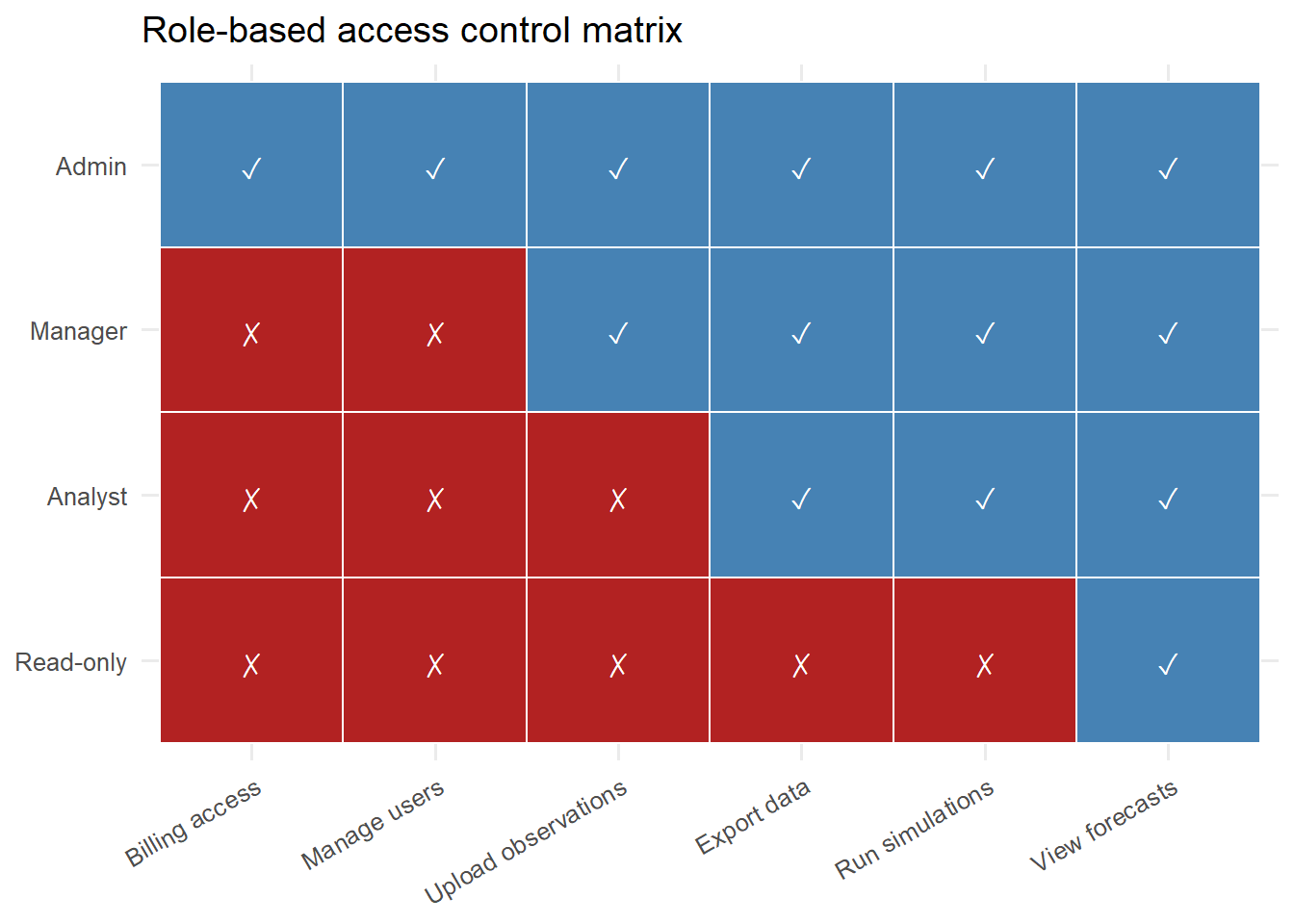
Role-permission matrix for a digital twin API. Each cell shows whether the role can perform the action. Analyst can query but not admin; Admin can do everything.
6 Token refresh and revocation
Access tokens should be short-lived (1 hour). Issue a refresh token (long-lived, stored in a database) so clients can get new access tokens without re-entering a password.
To revoke a compromised token: store a denylist in Redis. The verify_token function checks the token’s jti (unique ID) against the denylist before accepting it.
7 References
1.
Jones MB, Bradley J, Sakimura N. JSON web token (JWT). RFC 7519; 2015. doi:10.17487/RFC7519
2.
Hardt D. The OAuth 2.0 authorization framework. RFC 6749; 2012. doi:10.17487/RFC6749